

HINWEIS: Ich habe aktuell Probleme, DLIB zu kompilieren. Mein Basissystem erlaubt das Kompilieren von DLIB aufgrund von Versionsproblemen nicht. Daher kann ich den Nextcloud-Docker für die Gesichtserkennung nicht aktualisieren.
Magst du Gesichtserkennung für deine Familienfotos? Ich auch. Aber ich habe festgestellt, dass ich zu viel Zeit mit der Verwaltung verbringe, besonders mit dem Umziehen von Laptop zu Laptop. Und da ich mehrere Computer habe – gemischt Microsoft, Linux und Mac – hatte ich die Silos satt. Anfangs nutzte ich macOS Aperture, dann Fotos und und und …
Jedes Mal, wenn ich die Bilder ordentlich getaggt hatte, bekam ich einen neuen Computer, meine Frau konnte auf ihrem Laptop nicht auf die Fotos zugreifen und beschwerte sich ständig darüber. Also beschloss ich, alle Fotos auf meinen Nextcloud-Server zu verschieben. Ich betreibe Nextcloud auf einem Intel NUC zu Hause, mit Linux (Openmediavault) und intensiv mit Docker. Dank Duckdns kann ich von überall auf der Welt darauf zugreifen.
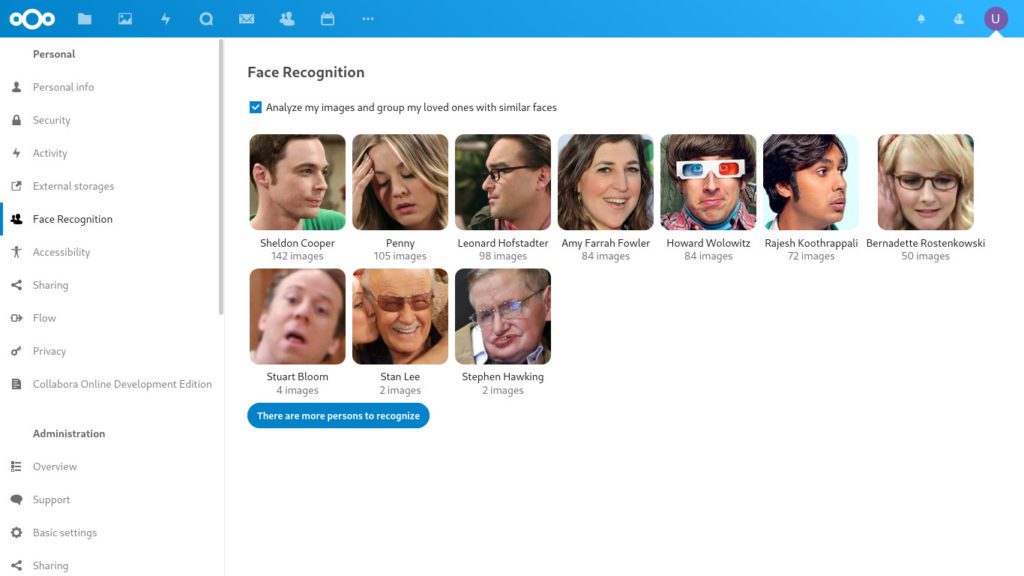
Da kein Nextcloud-Docker-Image die Voraussetzungen installiert hatte, die ich für die Gesichtserkennungs-App in Nextcloud brauchte, entschied ich mich, selbst ein Docker-Image zu erstellen und auf Docker Hub zu veröffentlichen. Nutze es gern. Ich pflege es und versuche, es Schritt für Schritt zu verbessern.


I have been looking for a solution for that setup as well!
Hi Klaus,
Fantastic! Thank you very much for sharing the docker image. Do you know if it’s feasible to have an `arm64` docker image ? I’d like to deploy nextcloud with face recognition a raspi 4B (8GB RAM). I’m new at docker…I’d be happy to help with it as a small hobby project.
Cheers,
—
Feth
Hey there,
I have analysed the underlaying nextcloud:apache dockerfile. There I have learn’t that you need to set NEXTCLOUD_UPDATE=1. Can you please try that?
Regards,
Klaus
Tell me, is there an instruction on how to perform the same steps as you in order to raise your docker image nextcloud?
At the same time, so that it is updated from the official repository and patched with my patches?
Hi Klaus,
I did follow the steps you mentioned but there is something misleading. If I go inside my docker instance and print the env variables from the command line I see
NEXTCLOUD_VERSION=20.0.4
However, when I log into the NC Web UI Admin -> Settings -> Overview I get notification saying a new version of NC is available and have the below info:
Version
Nextcloud 20.0.3
A new version is available: Nextcloud 20.0.4
Is there any reason why the version is not updated from the UI and as such not in sync causing the notification always to pop-up?
Thank you in advance.
Regards,
Antonio
Hi Antonio,
I have remove the ENV variable from my Dockerfile. So, removing it on your end and pulling the image again should update your nextcloud instance.
Cheers,
Klaus
Hi Klaus,
Thank you for coming back on this. I have a docker-compose with your NC image and I guess that this env variable is defined in your Dockerfile. Should I stop and pull all the images from the compose file and it will fix the problem? If I remove the env variable from the docker instance, I have a feeling that it will work but then, should I pull down and up the compose the env variable will be back. Or am I missing something?
Cheers.
Antonio
Hello Antonio,
it’s fixed. Please remove the ENV variable „NEXTCLOUD_UPDATE“ from your docker instance and pull the image again. Then you should see the updated version.
Cheers,
Klaus
Hello Antonio,
I will look into this. I can reproduce the update issue. Regards general updates: Yes, I will maintain this. Version 20.0.4 will be available as soon as the underlying nextcloud/apache:latest image is updated on 20.0.4. I checked this afternoon and it still was on 20.0.3.
Cheers,
Klaus
Hi IamKlaus,
I am using your docker image with the face recognition since one week now and seems all good. Thank You for your hard work on getting this done. I still need to find the best settings but I am sure playing around with it I will be able to find one that works.
However, I am just running into an issue and I wanted to double check with you. The NC UI is telling me that there is a new version 20.0.4 available. I am currently on version 20.0.3.
So, when I try to update it through command line using php occ upgrade it says `Nextcloud is already latest version` which clearly I am not. I have also tried from the UI through the Open Updater button but I am getting a 404 Not Found error. So, at this moment in time I am not sure how can I update my NC.
Would you have any idea? I would much appreciate your help.
Also, are you planning to maintain the docker image in the future?
Thank you again.
Regards,
Antonio