
HINWEIS: Ich habe aktuell Probleme, DLIB zu kompilieren. Mein Basissystem erlaubt das Kompilieren von DLIB aufgrund von Versionsproblemen nicht. Daher kann ich den Nextcloud-Docker für die Gesichtserkennung nicht aktualisieren.
Magst du Gesichtserkennung für deine Familienfotos? Ich auch. Aber ich habe festgestellt, dass ich zu viel Zeit mit der Verwaltung verbringe, besonders mit dem Umziehen von Laptop zu Laptop. Und da ich mehrere Computer habe – gemischt Microsoft, Linux und Mac – hatte ich die Silos satt. Anfangs nutzte ich macOS Aperture, dann Fotos und und und …
Jedes Mal, wenn ich die Bilder ordentlich getaggt hatte, bekam ich einen neuen Computer, meine Frau konnte auf ihrem Laptop nicht auf die Fotos zugreifen und beschwerte sich ständig darüber. Also beschloss ich, alle Fotos auf meinen Nextcloud-Server zu verschieben. Ich betreibe Nextcloud auf einem Intel NUC zu Hause, mit Linux (Openmediavault) und intensiv mit Docker. Dank Duckdns kann ich von überall auf der Welt darauf zugreifen.
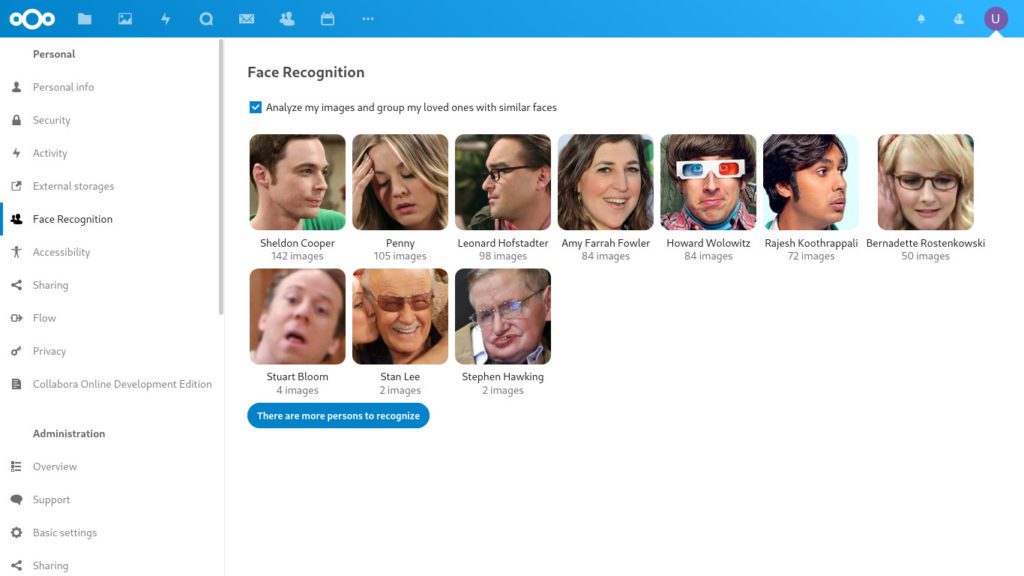
Da kein Nextcloud-Docker-Image die Voraussetzungen installiert hatte, die ich für die Gesichtserkennungs-App in Nextcloud brauchte, entschied ich mich, selbst ein Docker-Image zu erstellen und auf Docker Hub zu veröffentlichen. Nutze es gern. Ich pflege es und versuche, es Schritt für Schritt zu verbessern.



Not really, to be honest.
So, in general the Apache Image works in your local network, right?
But it does not work behind your Nginx Reverse proxy? Did you check all the log files to get an idea where the problem might be?
Unfortunately this is an x64 container. I do not support ARM architectures, which includes Raspberry PI. I am also wondering if an RPI is capable to handle the AI face detection, that takes a lot of CPU/GPU power. A jetson nano would probably be the better solution for something like that.
Hello
I’m new for portainer/docker. I have install as per instructions on https://hub.docker.com/_/nextcloud with Base version – apache and change to use this image (iamklaus/nextcloud). but cannot run and found error
exec /entrypoint.sh: exec format error
i don’t know how to fix this error, Could you help me to fix it?
Raspberry Pi4
OS: raspbian 64 bit
Thanks,
Hi Klaus,
I’m using nextcloud with portainer on my OMV NAS. All is working fine.
I use the Apache Image behind my Ngynx Proxy Manager. But when i try to use your Image, it doesnt work with my settings.
Any tip?
Hi Oleg,
it is super easy. Which version are you using from nextcloud? FPM or apache? And: Are you using portainer to manage your docker instances?
Regards,
Klaus
Hi Klaus! First of all thanks for your work, it’s awesome when someone shares his work!
I have a question about migrating from official Nextcloud docker to your image. Can you please describe how that can be done without losing all the settings, users and etc? Of course it’s best to start from fresh, but it’s just too much things I’ve set up already, but I really need face recognition, and the tutorial to add it is just too long and quite hard for me to follow and understand. Thanks a bunch!
Hi Klaus,
I managed to build a working Docker for my Raspi.
However, I had hard time to properly configure it, that is selecting the FaceReco models to use…and various other configs. See `occ` commands here https://github.com/matiasdelellis/facerecognition.
Do you have a recommendation on how to do it ?
Moreover, I’d like to store the data on a different location, typically to a drive connected via USB 3. I’m having the Argon One M.2 setting (https://www.jeffgeerling.com/blog/2021/argon-one-m2-raspberry-pi-ssd-case-review).
Do I have to change that in the Docker file or in CLI when starting the docker image ? Sorry if this is a basic `docker question`.
Anyways, I went back to a basic manual installation to test that every thing works (pictures loaded from family smartphones). It worked pretty well, and the models were able to execute on a collection of over 1000 images in just a couple of hours on the Raspi.
I went for MariaDB, and it was so satisfying to see all the FaceReco data written in the tables (including the descriptors) in the DB. Do you know if there’s documentation for the DB model. I would like to query specific photos, for example photos where the kids (son & daughter) are in…etc
Happy holidays and cheers,
—
Feth